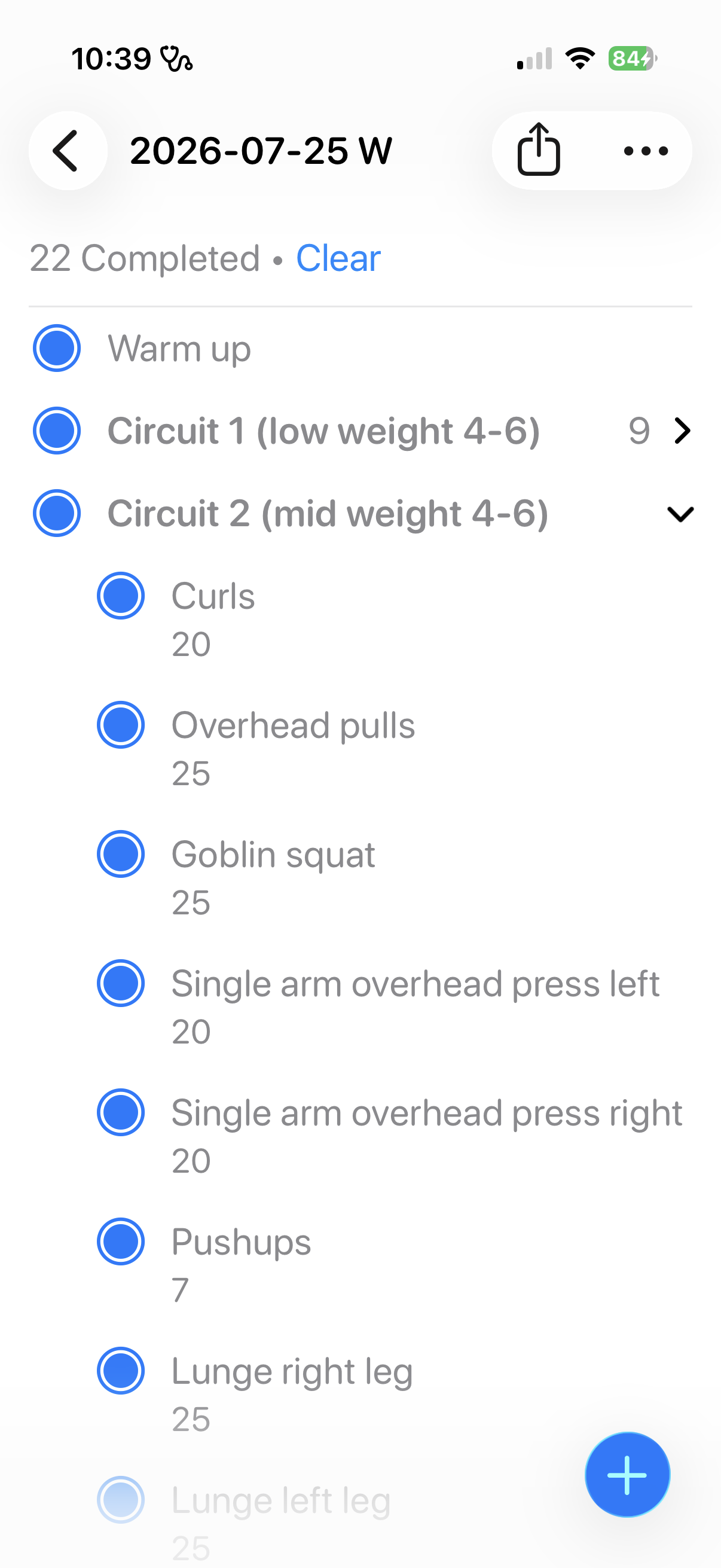
The reminders app is all you need to track your workouts. Spending money on fitness apps is a waste and it can be overwhelming. Plus it adds friction to getting started - why not use what you already have on your phone?
The epiphany I had was to see reminders as exercises. A to-do reminder is an exercise which needs to be completed. A completed reminder is a completed exercise. The next step was to see the “lists” – a list of reminders – as a workout – which is a list of exercises.
You can create a circuit of exercises by using the subtask function. Utilizing subtasks enables you to quickly duplicate a circuit within a list.
Entering exercises is quite fast just type and press return to create a new exercise (reminder).
After each exercise, you can add a note such as number of reps and weight.
I use the show completed option to retain a view of the exercises. Coming back to the list, I can see what I did, and adjust for the next time.
Once you created a workout you want to repeat, you can save the list as a “template”. Sadly, you can’t simply duplicate the previous workout (list) by long pressing the list in the main screen.
I’m a big fan of using the right tool for the right job. But repurposing a great tool for free is fun.
Sometimes we sit with decision paralysis or we waste time and money on finding a better tool. But then we miss the point – and the value – of just getting started.